Names and folders come back
NTFS, FAT32 and exFAT are read record by record, so deleted files return with their original names and paths. Damaged volumes are mounted through their backup boot sector automatically.
Self-service data recovery software for Windows
Scan your storage device, review detected files and supported previews, then choose a recovery plan based on how much data you need to recover. Velorex Recovery Intelligence reads NTFS, FAT32 and exFAT, carves what a format left behind, and includes logical disk and partition tools — every write backed up first and undoable.
How it works
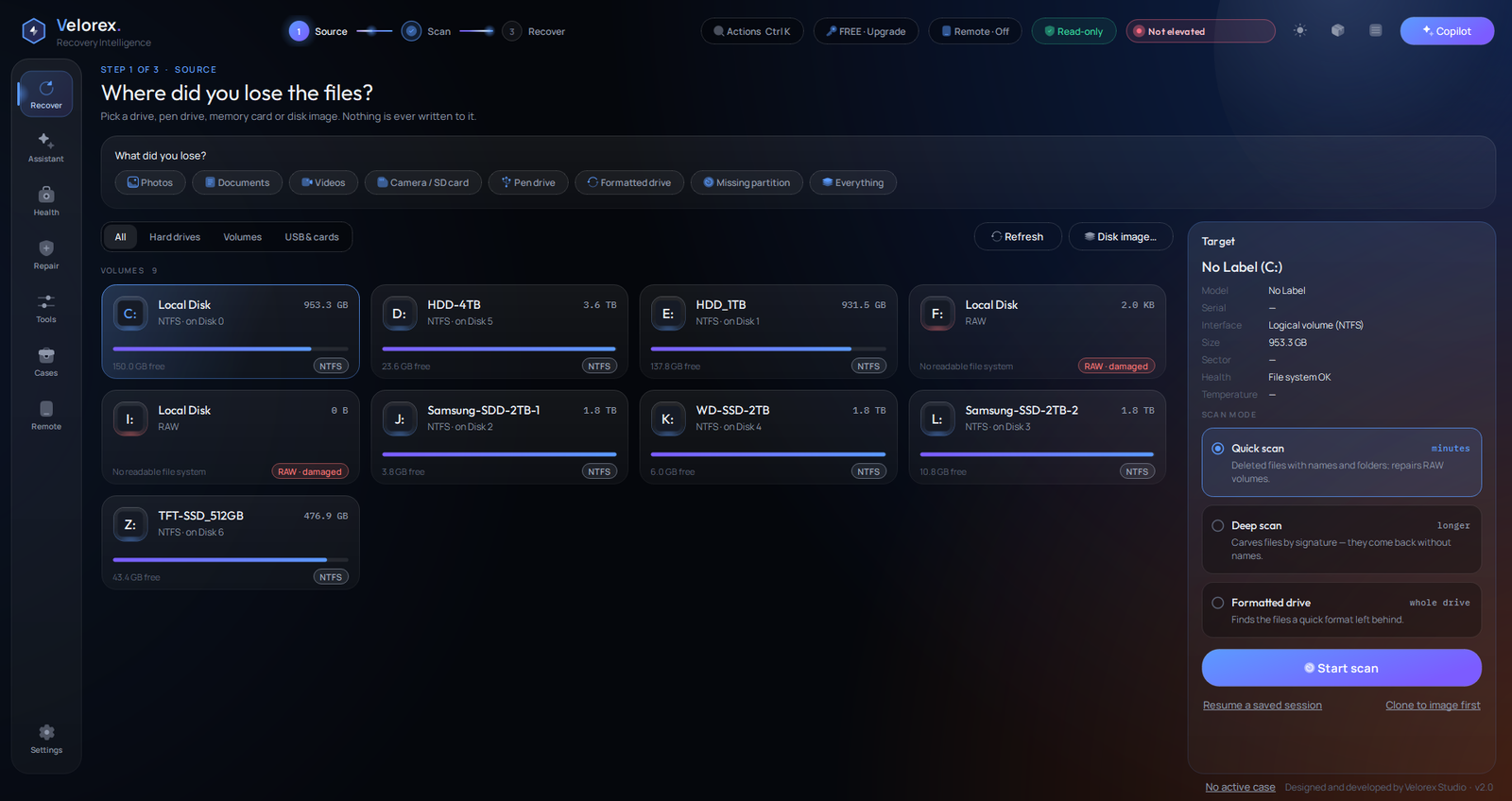
Tell it what you lost — photos, documents, a formatted card, a missing partition — and it chooses the drive and scan, then opens the results on the right file type.
Pick a volume, a whole disk, a pen drive, a memory card or a disk image. RAW volumes are flagged red — they are the usual rescue targets.
Quick rebuilds the folder tree with original names. Deep carves files by signature. Formatted finds the records a quick format left behind.
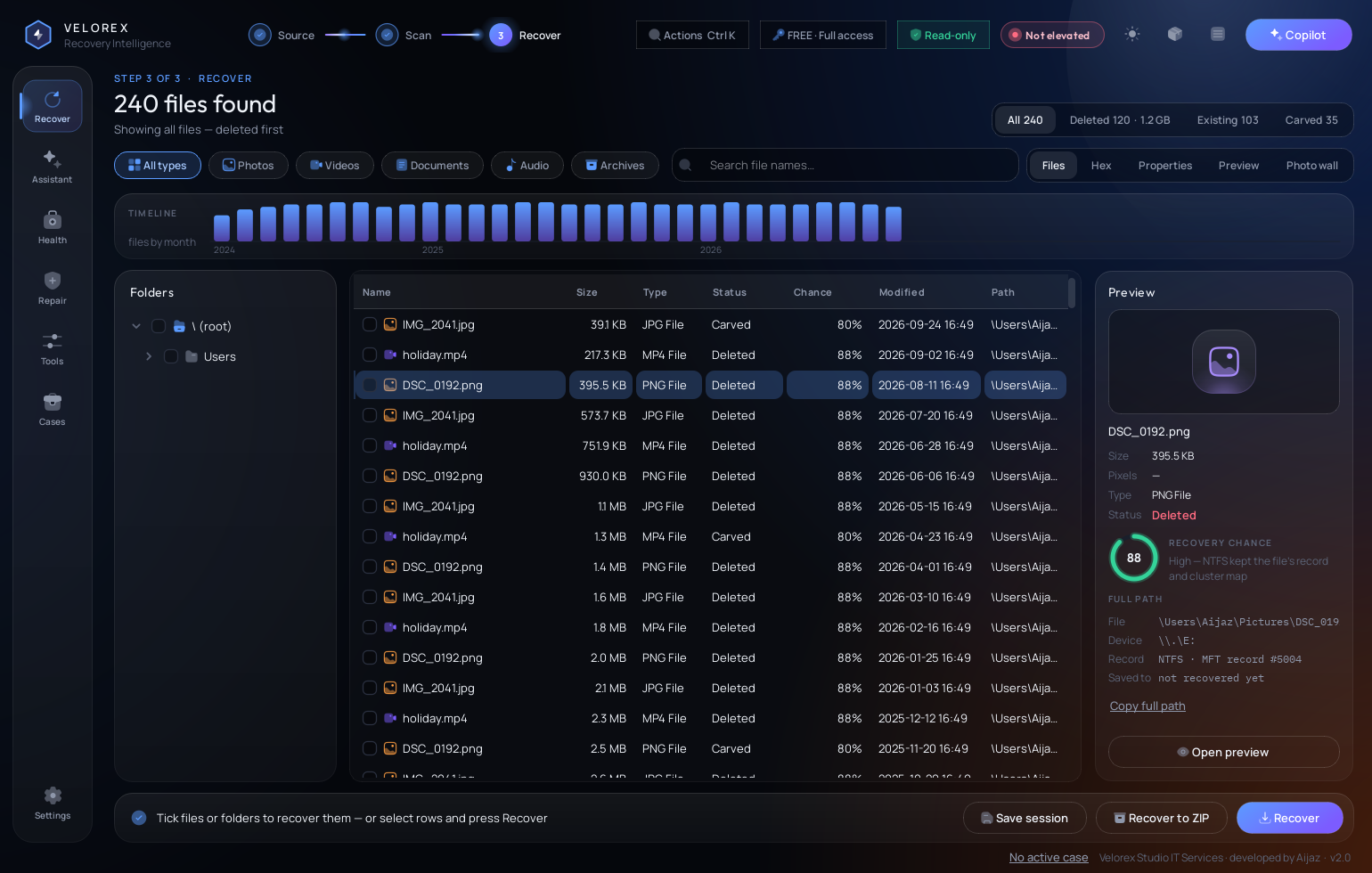
Browse while it scans, preview, tick what you need and copy it to a different drive — as folders or straight into a ZIP, with a report.
Features
NTFS, FAT32 and exFAT are read record by record, so deleted files return with their original names and paths. Damaged volumes are mounted through their backup boot sector automatically.
Signature carving for JPG, PNG, GIF, PDF, Office/ZIP, BMP and MP4 — plus a formatted-drive scan that finds the NTFS records a quick format left behind.
Restores damaged boot sectors and partition tables on RAW or “not initialized” disks from the drive's own backup copies — backed up first, verified, undoable. Logical faults only, not hardware.
Every result plotted by month. Click a month to see only the files from then — “the photos from last March” in one click.
Found images as a thumbnail grid that loads as you scroll. Tick straight from the wall.
An honest estimate per file, with the reason — how the file system stored it, its size, its age.
Original path, device path (\\.\E:), the on-disk record — MFT number, cluster or byte offset — and where it was saved.
S.M.A.R.T. attributes, temperature and a live surface heat-map. Weak drive? You are advised to image it before a long scan.
Finds deleted partitions by their boot sectors and explains which copy of MBR, GPT and boot sector is still good.
One case per job: customer, device, notes. While active it logs every scan, recovery and repair — exportable as a report.
Press Ctrl K and type — scan, repair, theme, health. Every action by name.
Image a problem drive once and work from the copy instead of reading the source again and again. Recover to folders or directly into a ZIP with MD5 / SHA-256 per file. Rebuild broken JPEG, PNG, Office and MP4 headers. Availability depends on your plan.
Logical disk & partition tools
Most RAW and “not initialized” drives still carry a healthy spare copy of the damaged structure. Drive Repair finds it and writes it back — and nothing else.
Drive Repair tools are intended for supported logical disk, partition and filesystem recovery operations. They do not repair physically damaged storage hardware.
DISK 1 to confirm — five steps, nothing hidden.The app
Themes
Click a theme — this page switches with it.
Safety & privacy
The drive you recover from is only read. Recovering onto it is refused.
Sectors are saved before they change, then verified after. Undo writes them back.
Low S.M.A.R.T. health? You are asked to image the drive before a long scan.
Scanning and recovery run on your own PC. File names and contents are never uploaded.
Nothing is written without your confirmation. Tools that write to a disk ask twice.
Cases log what was done and when, and export it as a report.
Preview plans - not for sale yet
Pricing & plans
Scan your storage device, review detected files and supported previews, then choose a recovery plan based on how much data you need to recover.
Purchasing a license does not guarantee recovery of specific files.
Free
₹0
500 MB recovery · no time expiry
Scan your drive and see what Velorex detects.
Preview plans - not for sale yetMini Recovery
₹199
1 GB OR 15 Days — whichever comes first.
Folder Structure Recovery is not included.
Standard Recovery
₹499
5 GB OR 30 Days — whichever comes first.
Large Recovery
₹799
100 GB OR 30 Days — whichever comes first.
Folder Structure Recovery attempts to reconstruct detected original folder and file paths where sufficient filesystem metadata remains. Results may be incomplete when metadata has been overwritten, damaged or lost.
24-Hour Recovery
₹499
100 GB OR 24 Hours — whichever comes first.
7-Day Recovery
₹899
250 GB OR 7 Days — whichever comes first.
30-Day Recovery
₹999
250 GB OR 30 Days — whichever comes first.
Power Recovery
₹1,299
1 TB OR 15 Days — whichever comes first.
Plans containing both a recovery allowance and a validity period expire when either limit is reached first.
Example — 7-Day Recovery: 250 GB allowance, 7 days validity. If you successfully recover 250 GB after 2 days, the recovery entitlement ends. If 7 days pass after activation and only 50 GB has been recovered, the recovery entitlement still ends.
Plan validity begins after first successful activation — not when you buy, and not when you visit this page.
Pro Annual
₹2,999 / year ₹1,499 first year · launch offer Regular price ₹2,999 / year
365 Days · No recovery data quota during the active annual license.
Online purchase of recovery plans is coming soon. Until it opens, create a free account, download the app and scan your drive: every scan is free, and the Free plan recovers up to 500 MB.
One plan covers one PC. When purchase opens, a plan for several PCs gives you one key per PC.
Plans are covered by the Terms & Conditions, License Agreement, Privacy Policy and Refund Policy.
Coming soon
These features are under development. They are not available today and are not part of any current plan.
AI-assisted recovery guidance, scan analysis and explanations designed to help users understand recovery results.
Future recovery capabilities for supported NAS storage systems, RAID configurations and multi-disk recovery scenarios.
Connect securely to Velorex Recovery Intelligence running on your computer to monitor recovery activity and perform supported remote actions.
Planned: monitor scan and recovery progress, view recovery status and license allowance, receive notifications, pause, resume, cancel or approve supported operations.
Final mobile features, supported platforms, remote actions and plan availability may change before release.
AI Recovery Assistant, NAS/RAID Recovery and Velorex Mobile Companion are currently under development. Final functionality, availability and plan eligibility may change before release. They are not guaranteed features of current purchases unless explicitly stated when released.
Feature comparison
| Feature | Free | Mini | Standard | Large | Recovery Passes24-Hour · 7-Day · 30-Day | Power | Pro Annual |
|---|---|---|---|---|---|---|---|
| Recovery allowance | 500 MB | 1 GB | 5 GB | 100 GB | 100 GB or 250 GB | 1 TB | No data quota |
| Validity | No expiry | 15 days | 30 days | 30 days | 24 hours, 7 days or 30 days | 15 days | 365 days |
| PCs per license key | This PC | 1 | 1 | 1 | 1 | 1 | 1 |
| Disk detection | Yes | Yes | Yes | Yes | Yes | Yes | Yes |
| Disk structure | Yes | Yes | Yes | Yes | Yes | Yes | Yes |
| Quick, Deep and Formatted-drive scans | Yes | Yes | Yes | Yes | Yes | Yes | Yes |
| Supported preview | Yes | Yes | Yes | Yes | Yes | Yes | Yes |
| Individual file recovery | Yes | Yes | Yes | Yes | Yes | Yes | Yes |
| Folder Structure Recovery | No | No | Yes | Yes | Yes | Yes | Yes |
| Lost Partition Search | No | No | Yes | Yes | Yes | Yes | Yes |
| Disk Imaging | No | No | No | Yes | Yes | Yes | Yes |
| ZIP Recovery | No | No | Yes | Yes | Yes | Yes | Yes |
| File Repair | No | No | Yes | Yes | Yes | Yes | Yes |
| Bad Sector Scan | No | No | No | Yes | Yes | Yes | Yes |
| Advanced utilitiesDuplicate Hunter, Boot Doctor and other released utilities | No | No | No | No | No | Yes | Yes |
| AI Recovery Assistant | Coming Soon Not part of any current plan | ||||||
| NAS / RAID Recovery | Coming Soon Not part of any current plan | ||||||
| Velorex Mobile Companion | Coming Soon Not part of any current plan | ||||||
Advanced utilities are separate from recovery. Tools that can write to a disk always ask for confirmation first, on every plan. A higher plan does not make a destructive operation safe.
Before you pay
We recommend scanning your storage device with Velorex Recovery Intelligence before purchasing a recovery plan.
Start with up to 500 MB of free recovery.
Questions
Detecting a 100 GB drive does not use 100 GB. Only data that is successfully recovered is counted.
Plan validity begins after first successful activation in the app. It does not start when you buy the plan or visit this website.
A plan with both a recovery allowance and a validity period ends when either limit is reached first. Files you have already recovered stay where you saved them, and scanning and supported preview remain available.
It attempts to reconstruct detected original folder and file paths where sufficient filesystem metadata remains. Results may be incomplete when metadata has been overwritten, damaged or lost. It is included from Standard Recovery upward. Free and Mini recover individual files.
No. Imaging makes a copy of a drive so you can work from the image instead of repeatedly reading a problematic source device. It does not repair hardware.
No. The software recovers what is still recoverable on the drive, and we do not guarantee that all of your data will come back. Purchasing a license does not guarantee recovery of specific files. That is why we recommend scanning first.
No. Velorex Recovery Intelligence is a software tool that you run yourself. We do not have a technician team, a laboratory or a clean room, and we do not take in drives for manual recovery.
One plan gives one license key, and a key works on one PC: the one whose machine ID you gave when ordering. The machine ID is shown in the app under Settings, License & updates. For several PCs, order the plan for each PC and you receive one key per PC, each with its own recovery allowance.
When your payment is confirmed, your key is emailed to the address of your account and shown on your account page. If you sign in inside the app with the same account, the key arrives there by itself. Online checkout is not available yet, so payment is confirmed by Velorex Studio IT Services.
The machine ID belongs to one Windows installation and changes when Windows is reinstalled or the PC is replaced. Contact Velorex Studio IT Services with your new machine ID to have your license moved.
Yes, a free one. The download is on your account page: create an account with your name, email and a password, and the Download button appears. There is nothing to pay, and scanning and the Free plan need no licence key. When a plan is bought, its key is issued to the same account and arrives inside the app.
Important information
Velorex Recovery Intelligence is self-service data recovery software. We provide the tool we developed: it reads your drive or disk and recovers the files, folders, photos and other data that are still recoverable. You run the recovery yourself, on your own computer.
We do not have a technician team that recovers data for you. Velorex Studio IT Services currently does not provide physical laboratory, clean-room or technician-assisted manual data recovery as part of these software plans.
Recovery results depend on the condition of the storage device, filesystem metadata, overwriting, SSD TRIM, encryption and other technical factors. Purchasing a license does not guarantee recovery of specific files.
We do not guarantee that all of your data will be recovered. Bad sectors, formatting and continued use of the drive after deletion also affect what can be recovered.
For the best recovery chances, avoid writing new data to the source drive and save recovered files to a different storage device.
The software works on logical faults. It does not repair physically damaged storage hardware.
Windows 10 / 11, 64-bit · Administrator rights for raw disk access.
The download is on your account page, for any signed-in account, free or paid. For the best recovery chances, avoid writing new data to the source drive: install the app and save recovered files on a different storage device.
Free to download and scan, with up to 500 MB of free recovery. Purchasing a license does not guarantee recovery of specific files.